Easy automated backup copies from any drive

We'll never grow tired of reminding you about the importance of backup copies. And with such a great backup tool as FBackup, you have no more excuses!

Top Recommended Alternative

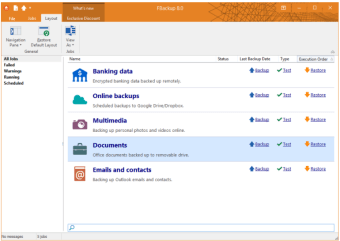
With FBackup you can configure and run backup copies at any time. The program lets you create as many backup jobs as you need – each of them with their own configuration settings – and you can also restore them whenever you need to have your data back.

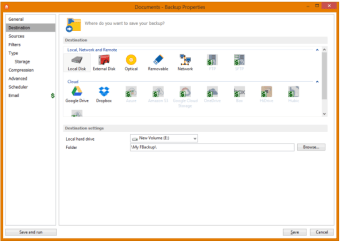
FBackup features a neat, intuitive interface and two different modes to create backups: Simple (a step-by-step wizard) and Advanced. I'd recommend using the Advanced one because it's more intuitive. FBackup can save your backup copies on your hard drive or networked drives, and has also some extra features like backup compression and backup scheduler.

Fbackup works perfectly fine and it's a great choice for all those in search of a decent, easy-to-use backup utility. On the downside, FBackup lacks a couple of options usually found in similar tools, such as the possibility to save your backup to an FTP server or the ability to create incremental backups.

With FBackup you can create simple backup copies in just a few steps and restore them at any moment.

Changes

New: Added command line application, so it's now possible to run FBackup from the command prompt, through .bat files or scripts New: Added an independent Test operation to allow verifying existing backups New: It is now possible to Pause and Resume a running backup Fix: Scheduler tasks created with the new backup wizard did not start. Fix: Time format used for scheduled jobs is now the same as Windows time format.

  • Pros

    • Nice wizard-style interface
    • You can create backup copies and restore them
    • Backup scheduler
    • Support for compressed backups
  • Cons

    • No incremental backups
 0/4

App specs

Program available in other languages


Icon of program: FBackup

FBackup for PC

  • Free
  • 3.3
    75
  • 15.4K
  • V9.9.999.0

User reviews about FBackup

3.3

1 reviews

Add review

Main reviews for you

  • Anonymous user

    Maybe we need to give the reliable programs in the market a try after a full search, not to try anything has at the end of its name a word like "copy or backup", I suggest to try the best like " TeraCopy, Gs richcopy 360, FastCopy, GoodSync..etc", just we need to search

More

You may also like

Alternatives to FBackup

Explore Apps

Latest articles

Laws concerning the use of this software vary from country to country. We do not encourage or condone the use of this program if it is in violation of these laws.
Softonic

Is FBackup safe?

100/100

Score result: Clean

This file passed a comprehensive security scan using VirusTotal technology. It is safe to download.

  • Virus free
  • Spyware free
  • Malware free
  • Verified by Security Partners

    VirusTotal logo

Scan Info

Last scan
Tuesday, November 25, 2025
Scan provider
VirusTotal · Full report

File Integrity

File
FBackup_V9.9.999.exe
SHA256
4b8825f3135bd443ff0c5e3f3dc12a8107bea6b9c8c916f72130b60e3895ecfa
SHA1
e5a4c59681399edcbfcfddc29c617d572e9711b4

Softonic security commitment

FBackup has been thoroughly scanned by our advanced security systems and verified by industry-leading partners. This file comes from the official developer and has passed all our security checks, showing no signs of viruses, malware, or spyware. For more information, visit our Security and Trust Center