Icon of program: FBackup

FBackup for Windows

  • Free
  • 3.3
    75
  • 15.4K
  • V9.9.1044.0
Free Download for Windows

View an ad to download for free

Easy automated backup copies from any drive

We'll never grow tired of reminding you about the importance of backup copies. And with such a great backup tool as FBackup, you have no more excuses!

Top Recommended Alternative

With FBackup you can configure and run backup copies at any time. The program lets you create as many backup jobs as you need – each of them with their own configuration settings – and you can also restore them whenever you need to have your data back.

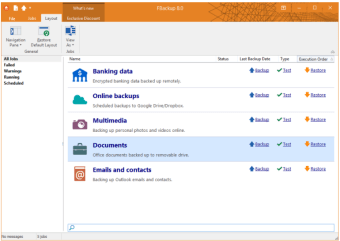
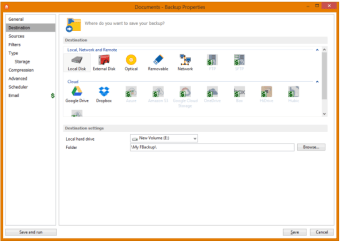
FBackup features a neat, intuitive interface and two different modes to create backups: Simple (a step-by-step wizard) and Advanced. I'd recommend using the Advanced one because it's more intuitive. FBackup can save your backup copies on your hard drive or networked drives, and has also some extra features like backup compression and backup scheduler.

Fbackup works perfectly fine and it's a great choice for all those in search of a decent, easy-to-use backup utility. On the downside, FBackup lacks a couple of options usually found in similar tools, such as the possibility to save your backup to an FTP server or the ability to create incremental backups.

With FBackup you can create simple backup copies in just a few steps and restore them at any moment.

New: Added command line application, so it's now possible to run FBackup from the command prompt, through .bat files or scripts New: Added an independent Test operation to allow verifying existing backups New: It is now possible to Pause and Resume a running backup Fix: Scheduler tasks created with the new backup wizard did not start. Fix: Time format used for scheduled jobs is now the same as Windows time format.


  • Pros

    • Nice wizard-style interface
    • You can create backup copies and restore them
    • Backup scheduler
    • Support for compressed backups
  • Cons

    • No incremental backups
 0/4

App specs

Program available in other languages


Icon of program: FBackup

FBackup for PC

  • Free
  • 3.3
    75
  • 15.4K
  • V9.9.1044.0
Free Download for PC

View an ad to download for free


User reviews about FBackup

3.3

1 reviews

Add review

Main reviews for you

  • Anonymous user

    Maybe we need to give the reliable programs in the market a try after a full search, not to try anything has at the end of its name a word like "copy or backup", I suggest to try the best like " TeraCopy, Gs richcopy 360, FastCopy, GoodSync..etc", just we need to search

More

You may also like

Alternatives to FBackup

Explore Apps

Latest articles

Laws concerning the use of this software vary from country to country. We do not encourage or condone the use of this program if it is in violation of these laws.
Softonic

Is FBackup safe?

100/100

Score result: Clean

This file passed a comprehensive security scan using VirusTotal technology. It is safe to download.

  • Virus free
  • Spyware free
  • Malware free
  • Verified by Security Partners

    VirusTotal logo

Scan Info

Last scan
Tuesday, April 14, 2026
Scan provider
VirusTotal · Full report

File Integrity

File
9.9.1044.0.exe
SHA256
13e93a4cdea89fdefef9fa2ef4d04f294690a4fa0f3df026dafee72b2821bbf2
SHA1
1856ebdc0fc75352ebb304b66a0e4ce5582b22e9

Softonic security commitment

FBackup has been thoroughly scanned by our advanced security systems and verified by industry-leading partners. This file comes from the official developer and has passed all our security checks, showing no signs of viruses, malware, or spyware. For more information, visit our Security and Trust Center

Signed in to Softonic as